En clase — Versión Cruda (Raw): con su equipo y proyecto ya asignados, hagan los 4 puntos rápido, en post-its reales, sin pulir la redacción. El objetivo es aterrizar ideas juntos, no producir el documento final. In class — Raw Version: with your already-assigned team and project, do all 4 points quickly, on real sticky notes, without polishing the wording. The goal is landing ideas together, not producing the final document.
Fuera de clase — Versión Refinada (entregable de Canvas): tomen esa versión cruda y redáctenla con cuidado — objetivo SMART bien escrito, Reach claro, WBS digitalizada y numerada, metas intermedias bien definidas. Esta es la versión que suben a Canvas, no las fotos de los post-its sin editar. Outside class — Refined Version (Canvas deliverable): take that raw version and write it up carefully — a well-written SMART objective, a clear Reach, a digitized and numbered WBS, well-defined intermediate goals. This is the version you upload to Canvas, not the unedited sticky-note photos.
- Diseñen el objetivo SMART y redáctenlo en un párrafo (hagan los supuestos de datos que sean necesarios).Design the SMART objective and write it down in a paragraph (make the necessary data assumptions).
- Establezcan el ALCANCE (Reach) del proyecto. Decidan y escriban qué SÍ y qué NO se va a considerar en el proyecto, o qué no pueden incluir. Esto sirve como los límites del proyecto.Establish the REACH of the project. Decide and write down what will and won't be considered in the project, or what you cannot include. This serves as the project's boundaries.
- Construyan la Estructura de Desglose del Trabajo (WBS) del proyecto, con un máximo de 3 niveles.Build the Work Breakdown Structure (WBS) of the project with a maximum of 3 levels.
- Una persona escribe las ideas iniciales en un post-it. Pueden completar las ideas.One person writes the actual ideas on a post-it. You can complete the ideas.
- Todos los integrantes del equipo escribirán al menos 3 ideas adicionales a lo ya establecido que se debe hacer para completar el proyecto.All team members will write at least 3 additional ideas to what has already been established must be done, to complete the project.
- Asegúrense de que todas las ideas EMPIECEN CON UN VERBO EN INFINITIVO (son actividades).Make sure that all ideas BEGIN WITH AN INFINITIVE VERB (they are activities).
- Produzcan un diagrama de afinidad colocando los post-its/tarjetas en una hoja. Una vez de acuerdo con esta división del trabajo, coloquen números que identifiquen cada nivel y cada actividad (en cada post-it/tarjeta).Produce an affinity diagram placing the post-its/cards on a page. Once you all agree on this division of labor, place numbers that identify each level and each activity (in each post-it/card).
- Definan 2 METAS INTERMEDIAS del proyecto. Las metas intermedias son resultados tangibles intermedios que nos permiten saber que vamos en la dirección correcta con el proyecto, de manera que podamos concluirlo. Es el equivalente a preguntarse: ¿qué logro nos dirá que estamos cerca del final del proyecto?Define 2 INTERMEDIATE GOALS of the project. The intermediate goals are intermediate tangible results that allow us to know that we are going in the right direction with the project, so as to be able to conclude it. It is the equivalent of asking yourselves: what achievement will tell us that we are close to the end of the project?
El punto 4 usa el mismo concepto de "Metas Intermedias" que ya vieron en el Project Charter — aquí solo piden 2, más enfocadas y ya derivadas de la WBS que acaban de construir, en vez de las 4-6 de alto nivel del Charter. Point 4 uses the same "Intermediate Goals" concept you already saw in the Project Charter — here they only ask for 2, more focused and already derived from the WBS you just built, instead of the 4-6 high-level ones from the Charter.
Dinámica del TallerWorkshop Flow
Redacten el objetivo SMART (10 min)Draft the SMART objective (10 min)
Con su equipo y proyecto asignados, escriban el párrafo del objetivo. Si necesitan un dato que no tienen, anótenlo como supuesto en vez de detenerse.With your assigned team and project, write the objective paragraph. If you need a data point you don't have, note it as an assumption instead of stopping.
Definan el Reach / límites (10 min)Define the Reach / boundaries (10 min)
Hagan dos listas: qué sí incluye el proyecto y qué explícitamente no incluye o no pueden incluir.Make two lists: what the project does include, and what it explicitly doesn't include or can't include.
Construyan la WBS con post-its (25-30 min)Build the WBS with sticky notes (25-30 min)
Sigan el método exacto de Canvas: una persona arranca, todos agregan mínimo 3 ideas más, todo en verbo infinitivo, agrupen por afinidad y numeren — en post-its reales o su equivalente digital.Follow the exact Canvas method: one person starts, everyone adds at least 3 more ideas, everything in infinitive-verb form, group by affinity, and number it — on real sticky notes or a digital equivalent.
Definan las 2 Metas Intermedias (10 min)Define the 2 Intermediate Goals (10 min)
Miren su WBS terminada y pregúntense: ¿qué logro a la mitad del camino nos confirmaría que vamos bien?Look at your finished WBS and ask: what halfway achievement would confirm we're on track?
Refinen y redacten la versión final (fuera de clase)Refine and write the final version (outside class)
Pulan la redacción de los 4 puntos, digitalicen la WBS (a mano o en una herramienta) y verifiquen consistencia con su Charter.Polish the wording of all 4 points, digitize the WBS (by hand or with a tool), and check consistency with your Charter.
Suban la versión refinada a CanvasUpload the refined version to Canvas
El objetivo SMART, el Reach, la WBS numerada (foto de los post-its o digitalizada) y las 2 metas intermedias — todo ya redactado con cuidado, no la versión cruda de la clase.The SMART objective, the Reach, the numbered WBS (photo of the sticky notes or digitized), and the 2 intermediate goals — all carefully written, not the raw in-class version.
Ejemplo de Referencia — Proyecto AtlasReference Example — Project Atlas
✅ Sí se consideraIs considered
- Consolidación y limpieza de datos históricosConsolidation and cleaning of historical data
- Modelo predictivo entrenado y validadoTrained and validated predictive model
- API de predicción y dashboard internoPrediction API and internal dashboard
🚫 No se considera / No se puede incluirNot considered / Cannot include
- Automatización de llamadas o correos de retenciónAutomating retention calls or emails
- Integración directa con el CRM (fuera del control del equipo)Direct CRM integration (outside the team's control)
- Modelos para otros tipos de predicción (fraude, demanda)Models for other prediction types (fraud, demand)
Versión completa de 4 ramas en la página de EDT/WBS.Full 4-branch version on the WBS page.
Cómo Construir esta WBS en Project Libre (paso a paso)How to Build this WBS in ProjectLibre (step by step)
Después del diagrama de afinidad en post-its, así es como pasan su WBS acordada a Project Libre. Si aún no lo tienen instalado, revisen el módulo de instalación primero. After the sticky-note affinity diagram, here's how you transfer your agreed WBS into ProjectLibre. If you haven't installed it yet, check the installation module first.
Crea un nuevo proyectoCreate a new project
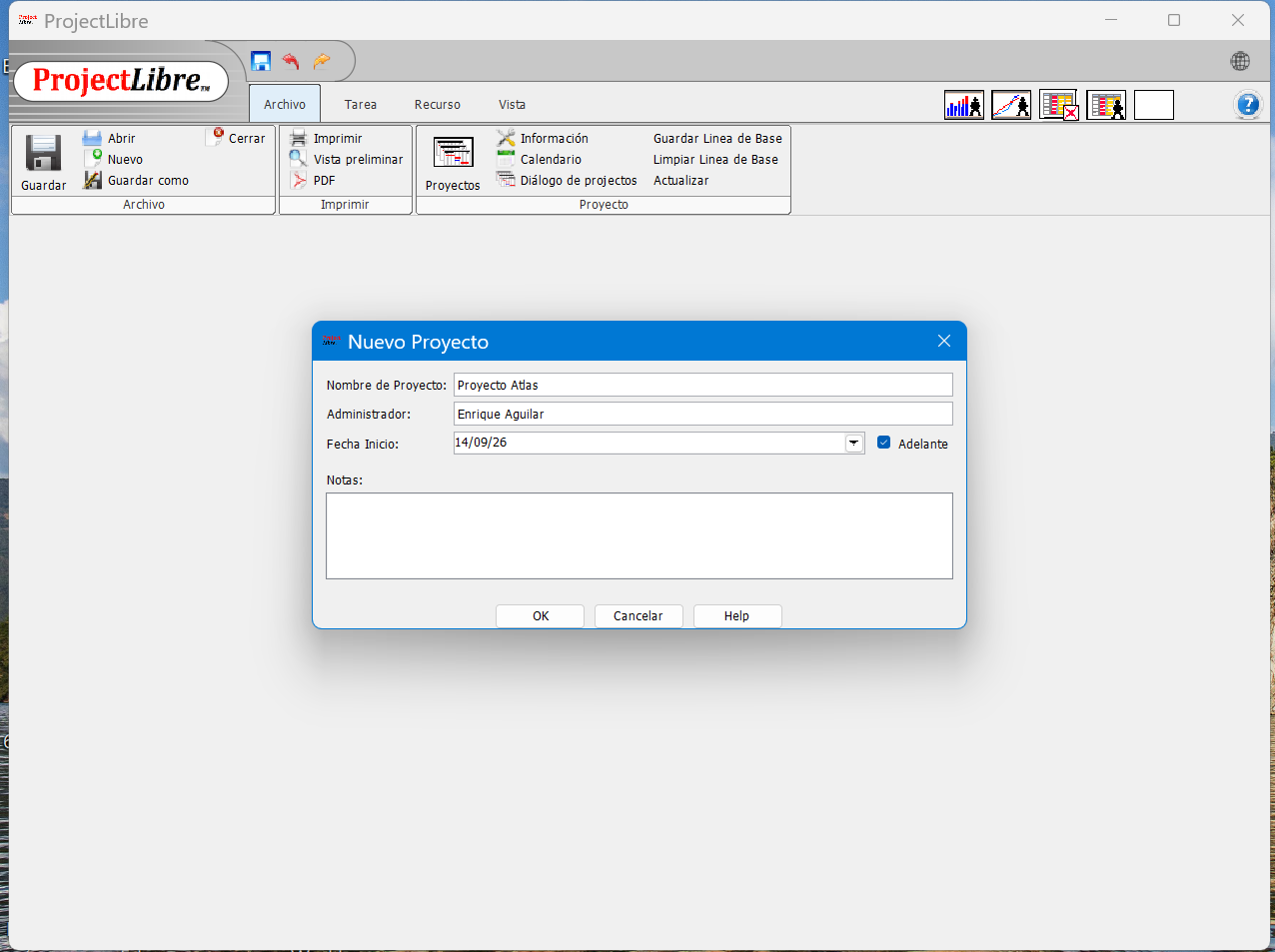
File → New Project. Escribe el nombre ("Proyecto Atlas") y una fecha de inicio, y da clic en OK. Quedarás en la vista de Gantt, con una tabla tipo Excel a la izquierda.File → New Project. Enter the name ("Project Atlas") and a start date, then click OK. You'll land on the Gantt view, with an Excel-like table on the left.
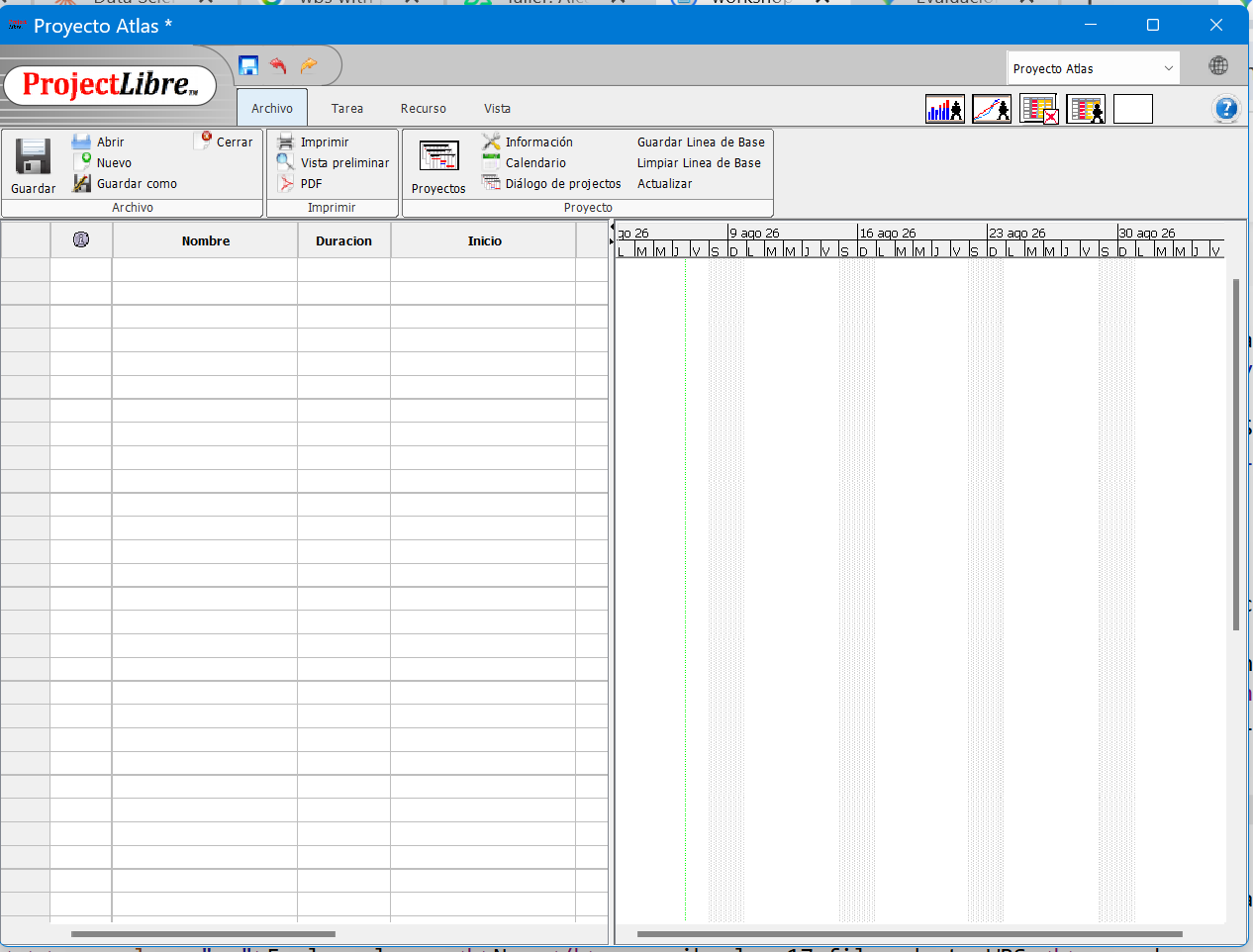
Escribe todas las tareas, sin indentar todavíaType all the tasks, without indenting yet
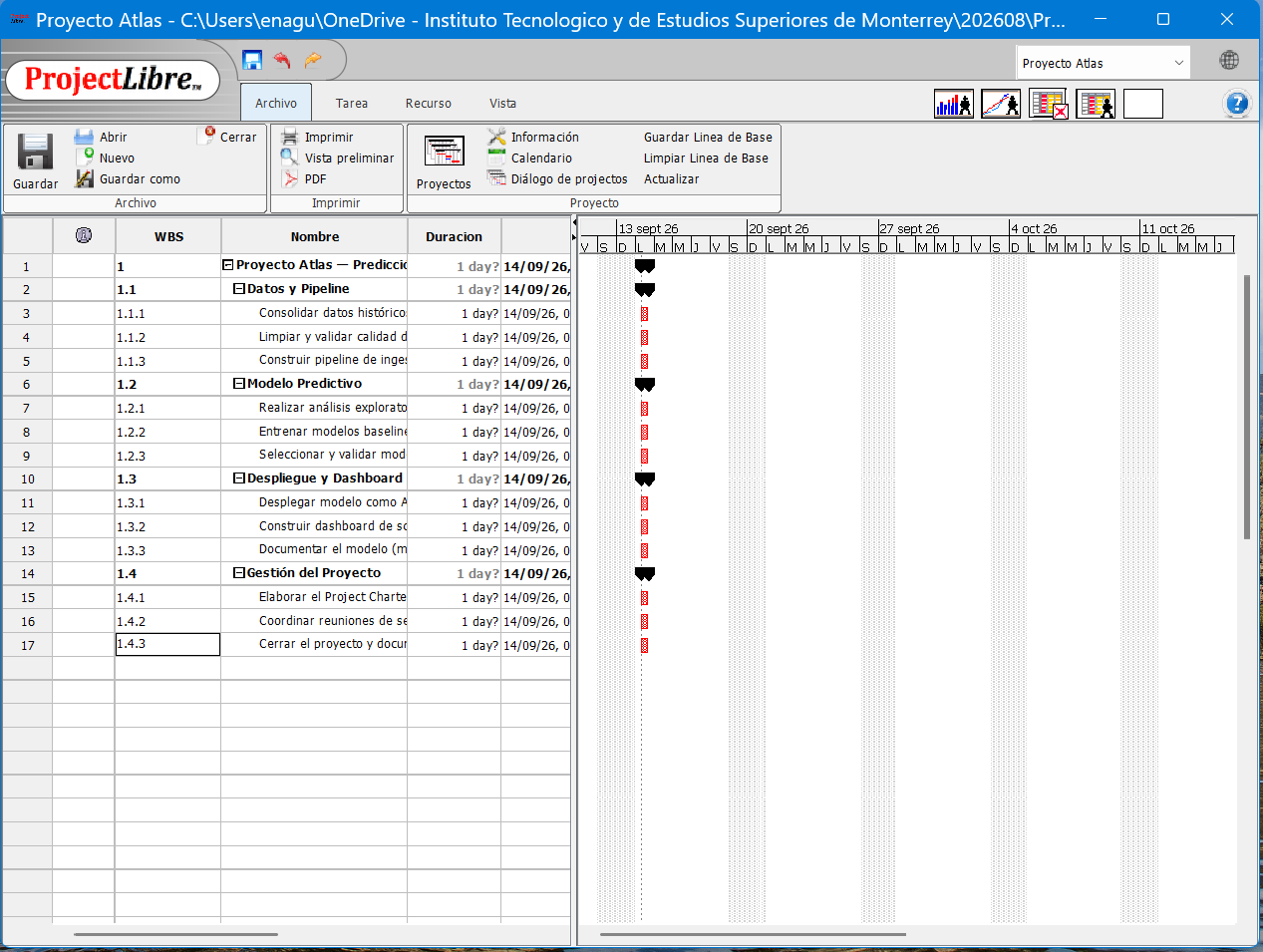
En la columna Name, escribe las 17 filas de tu WBS en orden, una por renglón (raíz, los 4 entregables, y sus paquetes de trabajo), tal como aparecen en la lista completa que tu profesor les compartió. Por ahora todas quedan al mismo nivel — la jerarquía se hace en el siguiente paso.In the Name column, type all 17 rows of your WBS in order, one per row (root, the 4 deliverables, and their work packages), exactly as they appear in the full list your instructor shared. For now they're all at the same level — the hierarchy happens in the next step.
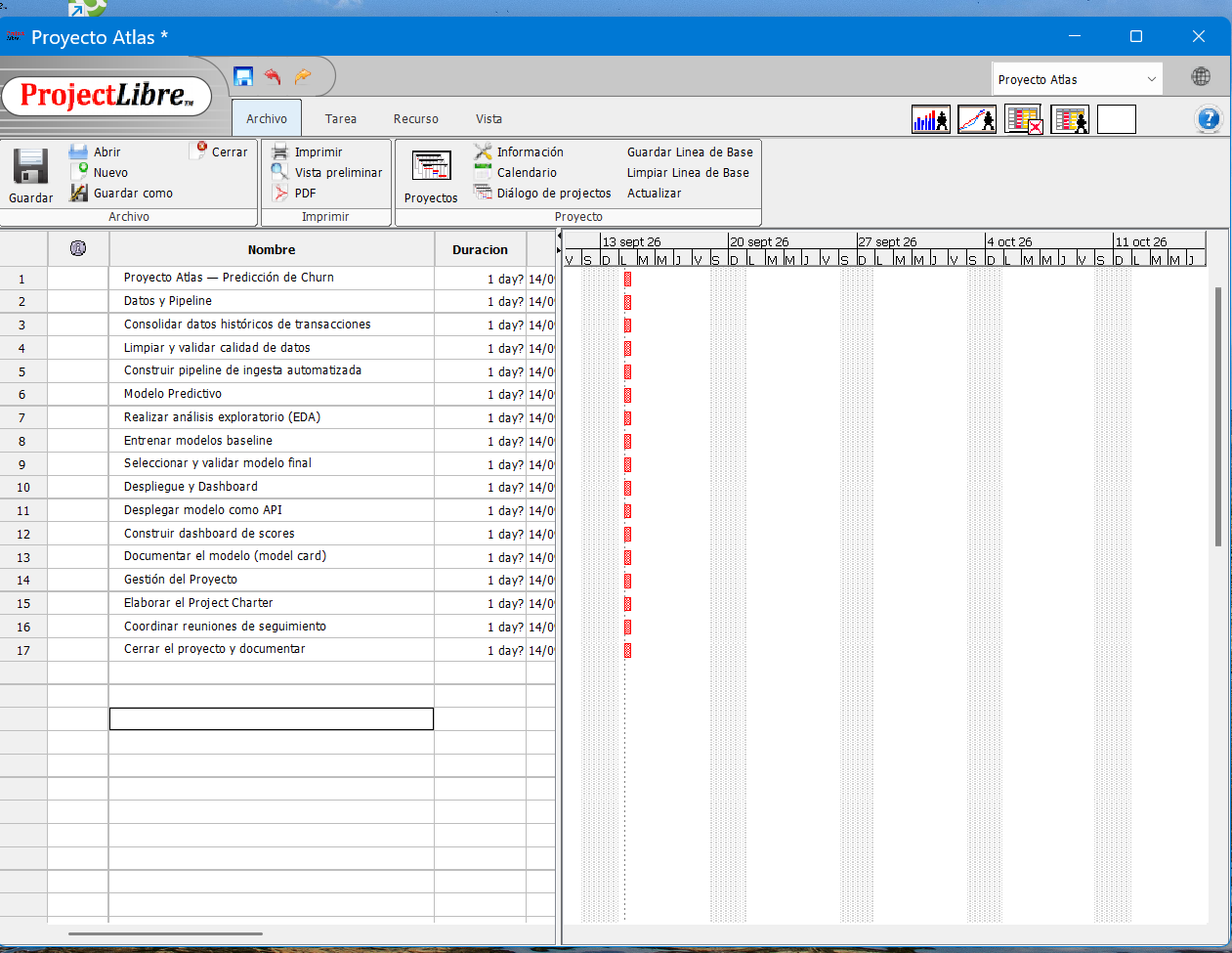
Indenta para crear los niveles 2 y 3Indent to create Levels 2 and 3
Selecciona una tarea y usa el botón "Indent Task" (▶) de la barra de herramientas para bajarla un nivel — la tarea de arriba se convierte automáticamente en "Tarea de Resumen" (negritas). Indenta los 4 entregables un nivel bajo la raíz, y cada paquete de trabajo un nivel más bajo su entregable. Usa "Outdent Task" (◀) si te pasaste de nivel.Select a task and use the "Indent Task" button (▶) on the toolbar to move it one level down — the task above automatically becomes a "Summary Task" (bold). Indent the 4 deliverables one level under the root, and each work package one level further under its deliverable. Use "Outdent Task" (◀) if you go one level too far.
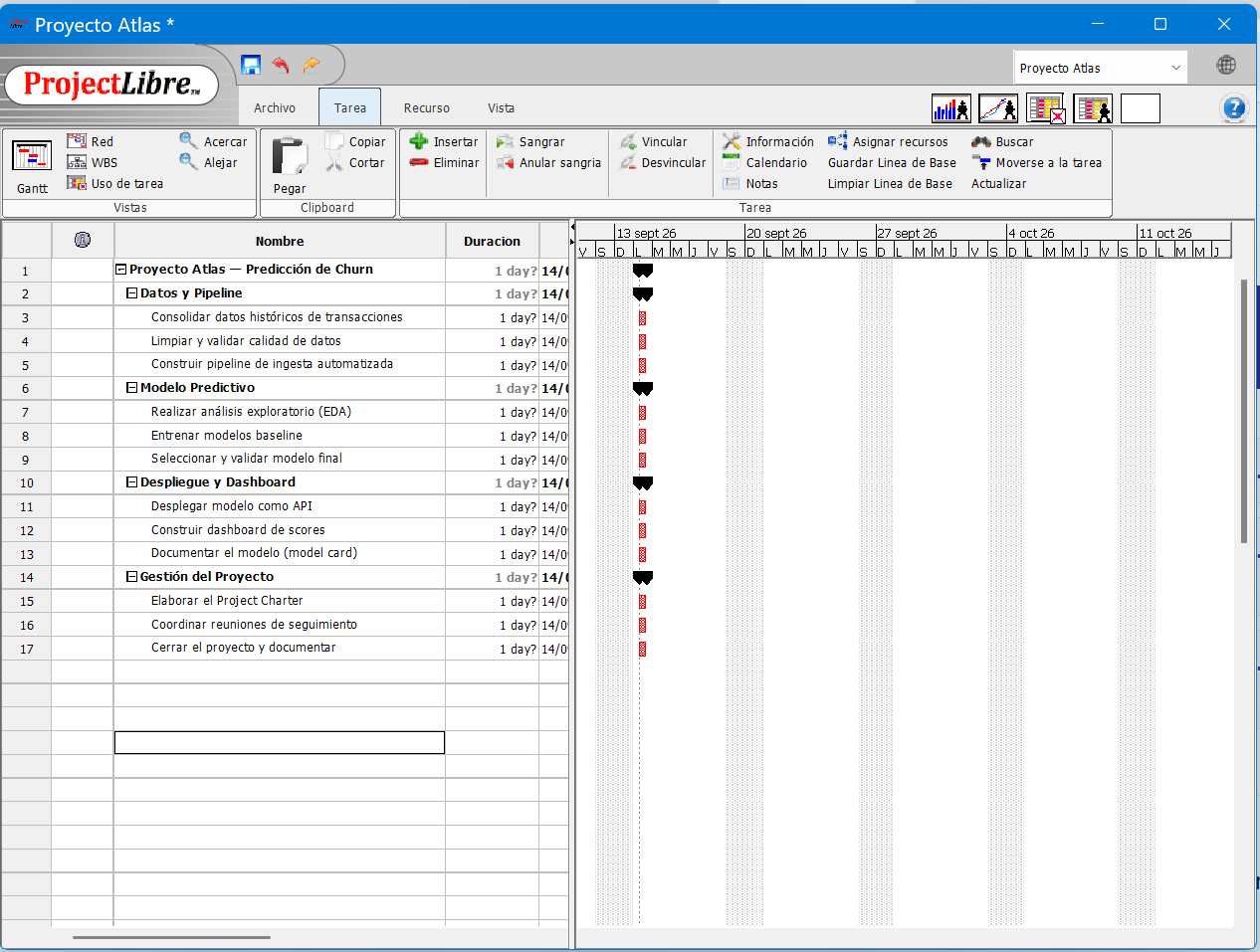
Verifica los códigos automáticos de la WBSVerify the automatic WBS codes
Project Libre genera solo los códigos (1, 1.1, 1.1.1…) automáticamente en la columna WBS conforme indentas. Si no ves esa columna, clic derecho en cualquier encabezado → Insert Column → WBS.ProjectLibre auto-generates the outline codes (1, 1.1, 1.1.1…) in the WBS column as you indent. If you don't see that column, right-click any header → Insert Column → WBS.
Cambia a la vista dedicada de WBSSwitch to the dedicated WBS view
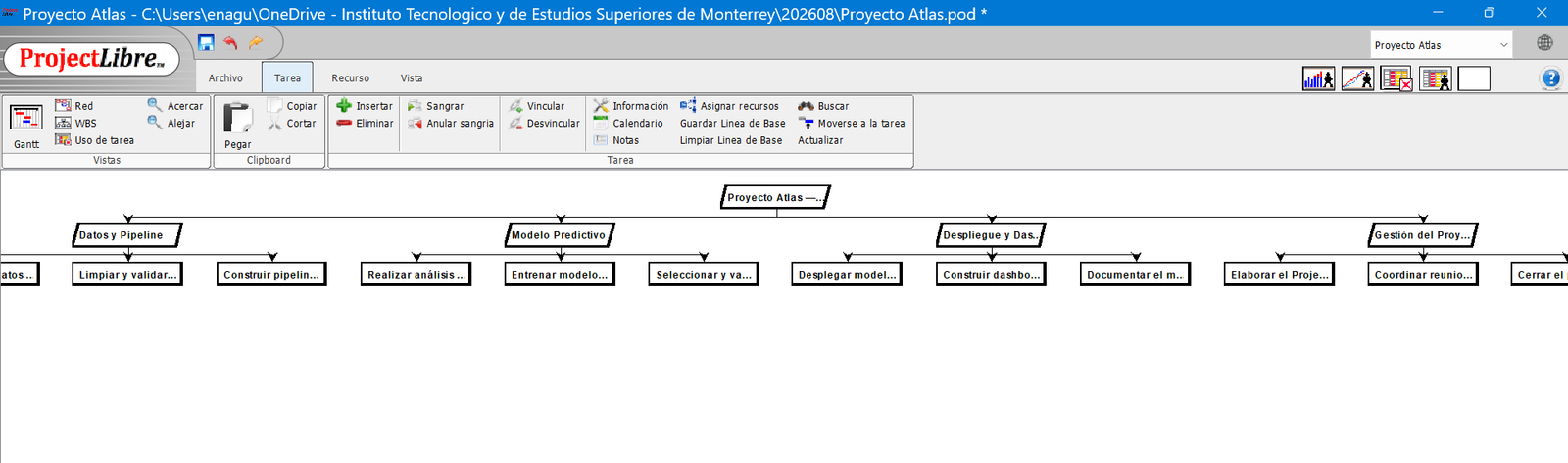
View → Task Views → WBS para ver tu estructura como árbol jerárquico en vez de tabla — esta es la vista que más se parece al diagrama que armaron con post-its.View → Task Views → WBS to see your structure as a hierarchical tree instead of a table — this is the view that most resembles the diagram you built with sticky notes.
Guarda tu archivoSave your file
File → Save As — usen un nombre claro, por ejemplo WBS_EquipoX.pod. Este archivo también lo usarán en el módulo de Cronograma para construir el Gantt.File → Save As — use a clear name, e.g. WBS_TeamX.pod. You'll also use this same file in the Schedule module to build the Gantt.
Pueden pegar (Ctrl+V) varias filas de texto de un jalón en la columna Name, igual que en una hoja de cálculo — no tienen que escribir tarea por tarea si ya tienen su lista lista en un documento. You can paste (Ctrl+V) several rows of text at once into the Name column, just like in a spreadsheet — you don't have to type task by task if your list is already ready in a document.
Meta 2: Modelo final validado con recall ≥75% en el set de prueba — confirma que el proyecto está listo para pasar a despliegue. Goal 1: Baseline model trained with a first documented recall result — confirms the data pipeline and technical approach work end to end.
Goal 2: Final model validated with recall ≥75% on the test set — confirms the project is ready to move to deployment.
Elijan sus 2 metas intermedias de forma que estén espaciadas a lo largo del proyecto (no las dos casi al final) — una buena meta intermedia suele caer alrededor del 40-60% del tiempo total. Pick your 2 intermediate goals so they're spread out across the project (not both near the end) — a good intermediate goal usually falls around 40-60% of the total time.
Ahora les Toca a UstedesNow It's Your Turn
Usen esta misma estructura con su equipo. Recuerden: el diagrama de afinidad se hace mejor a mano, con post-its reales (o su equivalente digital tipo Miro/Jamboard) — esta plantilla es solo para organizar lo que ya acordaron. Use this same structure with your team. Remember: the affinity diagram is best done by hand, with real sticky notes (or a digital equivalent like Miro/Jamboard) — this template is just to organize what you've already agreed on.
✅ Sí se consideraIs considered
- ……
🚫 No se consideraNot considered
- ……
Meta 2: …Goal 1: …
Goal 2: …
Checklist Antes de Entregar en CanvasChecklist Before Submitting to Canvas
Marca cada punto conforme lo verifiquen en equipo (esta lista es solo de apoyo — no se guarda ni se envía): Check each item as your team verifies it (this list is just a helper — it isn't saved or submitted):