🕵️ Caso #CRONO-01: La Ruta Crítica DesaparecidaCase #CRONO-01: The Missing Critical Path
Su equipo es ahora un escuadrón de detectives de cronograma. Tienen una lista de actividades sueltas y ningún sospechoso confirmado de ser "predecesor real". Su misión: interrogar cada actividad, armar la red, calcular ES/EF/LS/LF, y resolver el caso — identificar la Ruta Crítica exacta de su proyecto. Ganan placas (🥉🥈🥇) según qué tan limpio quede el caso. Your team is now a schedule detective squad. You have a list of loose activities and no confirmed suspect for being a "real predecessor". Your mission: interrogate every activity, build the network, calculate ES/EF/LS/LF, and solve the case — identify your project's exact Critical Path. You earn badges (🥉🥈🥇) based on how clean the case turns out.
Evidencia del Caso: Tabla de Tareas de AtlasCase Evidence: Atlas's Task Table
Antes de investigar su propio proyecto, revisen el caso ya resuelto de Atlas: la EDT con sus 12 Paquetes de Trabajo en 4 ramas, más 4 hitos (🚩) que coinciden con las metas del Charter (Sem 2, Sem 8 y Sem 12). Las filas en gris son resúmenes de la EDT: no llevan duración ni predecesores propios, Project Libre los calcula. El cronograma dura 60 días hábiles (12 semanas). Before investigating your own project, review Atlas's already-solved case: the WBS with its 12 Work Packages in 4 branches, plus 4 milestones (🚩) matching the Charter goals (Wk 2, Wk 8 and Wk 12). Gray rows are WBS summaries: they carry no duration or predecessors of their own, ProjectLibre computes them. The schedule lasts 60 working days (12 weeks).
| ID | Tarea (EDT)Task (WBS) | DuraciónDuration | Predecesor(es)Predecessor(s) |
|---|---|---|---|
| 1 | 1 Proyecto Atlas — Predicción de ChurnAtlas Project — Churn Prediction | — | — |
| 2 | 1.1 Datos y PipelineData and Pipeline | — | — |
| 3 | 1.1.1 Consolidar datos históricos de transaccionesConsolidate historical transaction data | 4d | 18 |
| 4 | 1.1.2 Limpiar y validar calidad de datosClean and validate data quality | 4d | 3 |
| 5 | 🚩 Hito: Datos consolidados y validados (Sem 2)Milestone: Data consolidated and validated (Wk 2) | 0d | 4 |
| 6 | 1.1.3 Construir pipeline de ingesta automatizadaBuild automated ingestion pipeline | 10d | 4 |
| 7 | 1.2 Modelo PredictivoPredictive Model | — | — |
| 8 | 1.2.1 Realizar análisis exploratorio (EDA)Perform exploratory analysis (EDA) | 8d | 4 |
| 9 | 1.2.2 Entrenar modelos baselineTrain baseline models | 12d | 8 |
| 10 | 1.2.3 Seleccionar y validar modelo finalSelect and validate final model | 10d | 9 |
| 11 | 🚩 Hito: Modelo validado, recall ≥75% (Sem 8)Milestone: Model validated, recall ≥75% (Wk 8) | 0d | 10 |
| 12 | 1.3 Despliegue y DashboardDeployment and Dashboard | — | — |
| 13 | 1.3.1 Desplegar modelo como APIDeploy model as an API | 10d | 6; 10FS+2d |
| 14 | 1.3.2 Construir dashboard de scoresBuild score dashboard | 8d | 10 |
| 15 | 1.3.3 Documentar el modelo (model card)Document the model (model card) | 5d | 10 |
| 16 | 1.4 Gestión del ProyectoProject Management | — | — |
| 17 | 1.4.1 Elaborar el Project CharterDraft the Project Charter | 2d | — |
| 18 | 🚩 Hito: Charter aprobadoMilestone: Charter approved | 0d | 17 |
| 19 | 1.4.2 Coordinar reuniones de seguimientoCoordinate follow-up meetings | 55d | 18 |
| 20 | 1.4.3 Cerrar el proyecto y documentarClose the project and document | 8d | 13,14,15 |
| 21 | 🚩 Hito: Proyecto cerrado y aceptado (Sem 12)Milestone: Project closed and accepted (Wk 12) | 0d | 20 |
1) Paralelismo: las tareas 6, 8 (predecesora: 4) y 14, 15 (predecesora: 10) ocurren al mismo tiempo; encadenarlas "porque venían después en la lista" sería una dependencia falsa. 2) Predecesores múltiples: la tarea 20 espera a 13, 14 y 15, y la 13 espera a 6 y a 10. 3) FS+2d: la tarea 13 depende de la 10 con 2 días de espera tras terminarla (revisión de seguridad y aprobación del Sponsor antes de publicar la API). Ese retraso es tiempo de espera, no trabajo: no consume horas del equipo, pero sí empuja el calendario. 1) Parallelism: tasks 6, 8 (predecessor: 4) and 14, 15 (predecessor: 10) happen at the same time; chaining them "because they came next on the list" would be a false dependency. 2) Multiple predecessors: task 20 waits for 13, 14 and 15, and task 13 waits for 6 and 10. 3) FS+2d: task 13 depends on 10 with a 2-day wait after it finishes (security review and Sponsor approval before publishing the API). That lag is waiting time, not work: it uses no team hours, but it does push the calendar.
Charter al final de la EDT, pero primero en el tiempo. Está en la rama 1.4 (Gestión), por eso su fila (17) viene después de las demás y la tarea 3 lo referencia hacia abajo (predecesor 18). Es válido: el orden de la EDT no es el orden de ejecución. Reuniones de seguimiento (19): es un esfuerzo continuo, no una actividad con inicio y fin reales. Se modela como una sola barra de 55d que arranca al aprobar el Charter; es una simplificación para el taller, y por eso muestra 3 días de holgura sin que eso signifique que "sobra tiempo". Charter last in the WBS, but first in time. It sits in branch 1.4 (Management), so its row (17) comes after the others and task 3 references it downward (predecessor 18). That's valid: WBS order is not execution order. Follow-up meetings (19): this is continuous effort, not an activity with a real start and finish. It is modeled as a single 55d bar starting when the Charter is approved; it's a workshop simplification, and that's why it shows 3 days of float without meaning there is "spare time".
🔓 Solución del caso (solo para el profesor o para verificar al final)🔓 Case solution (instructor only, or to check at the end)
Convención: ES = inicio más temprano, EF = ES + Duración, con el día 0 como inicio del proyecto. Holgura = LS − ES. La ruta crítica (🔴) es: Charter → Charter aprobado → Consolidar → Limpiar → EDA → Baselines → Seleccionar (+2d de espera) → API → Cerrar → Proyecto cerrado. Dura 60 días. Convention: ES = early start, EF = ES + Duration, with day 0 as project start. Float = LS − ES. The critical path (🔴) is: Charter → Charter approved → Consolidate → Clean → EDA → Baselines → Select (+2d wait) → API → Close → Project closed. It lasts 60 days.
| ID | TareaTask | Dur | ES | EF | LS | LF | HolguraFloat | CríticaCritical |
|---|---|---|---|---|---|---|---|---|
| 3 | Consolidar datos históricos de transaccionesConsolidate historical transaction data | 4d | 2 | 6 | 2 | 6 | 0 | 🔴 |
| 4 | Limpiar y validar calidad de datosClean and validate data quality | 4d | 6 | 10 | 6 | 10 | 0 | 🔴 |
| 5 | Hito: Datos consolidados y validados (Sem 2)Milestone: Data consolidated and validated (Wk 2) | 0d | 10 | 10 | 60 | 60 | 50 | |
| 6 | Construir pipeline de ingesta automatizadaBuild automated ingestion pipeline | 10d | 10 | 20 | 32 | 42 | 22 | |
| 8 | Realizar análisis exploratorio (EDA)Perform exploratory analysis (EDA) | 8d | 10 | 18 | 10 | 18 | 0 | 🔴 |
| 9 | Entrenar modelos baselineTrain baseline models | 12d | 18 | 30 | 18 | 30 | 0 | 🔴 |
| 10 | Seleccionar y validar modelo finalSelect and validate final model | 10d | 30 | 40 | 30 | 40 | 0 | 🔴 |
| 11 | Hito: Modelo validado, recall ≥75% (Sem 8)Milestone: Model validated, recall ≥75% (Wk 8) | 0d | 40 | 40 | 60 | 60 | 20 | |
| 13 | Desplegar modelo como APIDeploy model as an API | 10d | 42 | 52 | 42 | 52 | 0 | 🔴 |
| 14 | Construir dashboard de scoresBuild score dashboard | 8d | 40 | 48 | 44 | 52 | 4 | |
| 15 | Documentar el modelo (model card)Document the model (model card) | 5d | 40 | 45 | 47 | 52 | 7 | |
| 17 | Elaborar el Project CharterDraft the Project Charter | 2d | 0 | 2 | 0 | 2 | 0 | 🔴 |
| 18 | Hito: Charter aprobadoMilestone: Charter approved | 0d | 2 | 2 | 2 | 2 | 0 | 🔴 |
| 19 | Coordinar reuniones de seguimientoCoordinate follow-up meetings | 55d | 2 | 57 | 5 | 60 | 3 | |
| 20 | Cerrar el proyecto y documentarClose the project and document | 8d | 52 | 60 | 52 | 60 | 0 | 🔴 |
| 21 | Hito: Proyecto cerrado y aceptado (Sem 12)Milestone: Project closed and accepted (Wk 12) | 0d | 60 | 60 | 60 | 60 | 0 | 🔴 |
Holguras a comentar: Pipeline (22d, solo la API lo necesita y hasta el día 42), Model card (7d), Dashboard (4d) y Reuniones (3d). Si el Dashboard se retrasa 4 días no pasa nada; si se retrasa 5, el cierre se mueve. Float to discuss: Pipeline (22d, only the API needs it, and not before day 42), Model card (7d), Dashboard (4d) and Meetings (3d). If the Dashboard slips 4 days nothing happens; if it slips 5, the close moves.
Cómo Construir este Cronograma en Project LibreHow to Build this Schedule in ProjectLibre
Sigan estos 8 pasos con el caso Atlas; después repitan el procedimiento con su propio proyecto. Cada paso tiene una captura sugerida para su evidencia. Si ya tienen el archivo .pod con su WBS, continúen desde el paso 2. Follow these 8 steps with the Atlas case; then repeat the procedure with your own project. Each step has a suggested screenshot as evidence. If you already have the .pod file with your WBS, continue from step 2.
Del WBS al Gantt con Ruta CríticaFrom the WBS to the Gantt with Critical Path
Captura la EDT con su jerarquíaEnter the WBS with its hierarchy
Escribe las 21 filas de la tabla en la columna Name, en el mismo orden y con la misma numeración de ID. Usa Indent (flecha a la derecha) para que 1.1 a 1.4 queden dentro de "Proyecto Atlas", y las actividades dentro de su rama. Los resúmenes se muestran en negrita.Type the 21 table rows into the Name column, in the same order and with the same ID numbering. Use Indent (right arrow) so 1.1 to 1.4 sit inside "Atlas Project", and activities inside their branch. Summaries appear in bold.
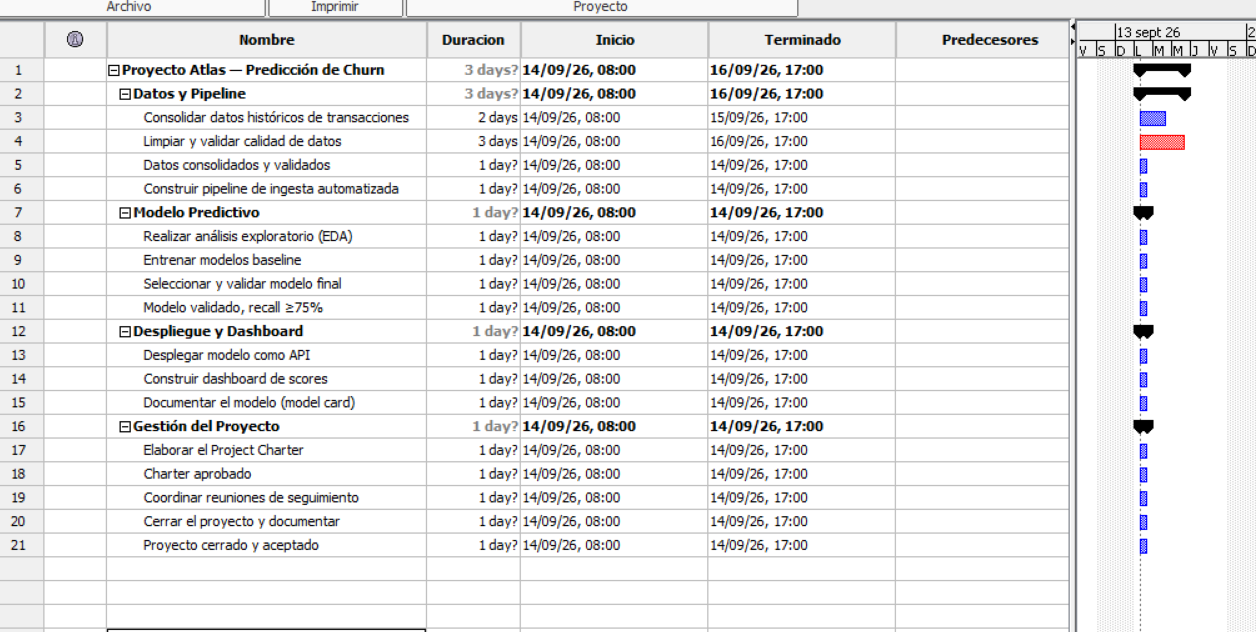 📸Captura 1Screenshot 1Tabla con la jerarquía de 3 niveles, sin duraciones ni predecesores todavía.Table with the 3-level hierarchy, no durations or predecessors yet.
Agrega las duracionesAdd the durations
En Duration de cada actividad (no de los resúmenes) escribe el valor de la tabla, por ejemplo 4d. Los resúmenes suman solos a partir de sus hijos. En este punto todas las barras arrancan el mismo día: es normal, todavía no hay dependencias.In Duration for each activity (not for summaries) type the value from the table, e.g. 4d. Summaries roll up on their own from their children. At this point all bars start on the same day: that's normal, there are no dependencies yet.
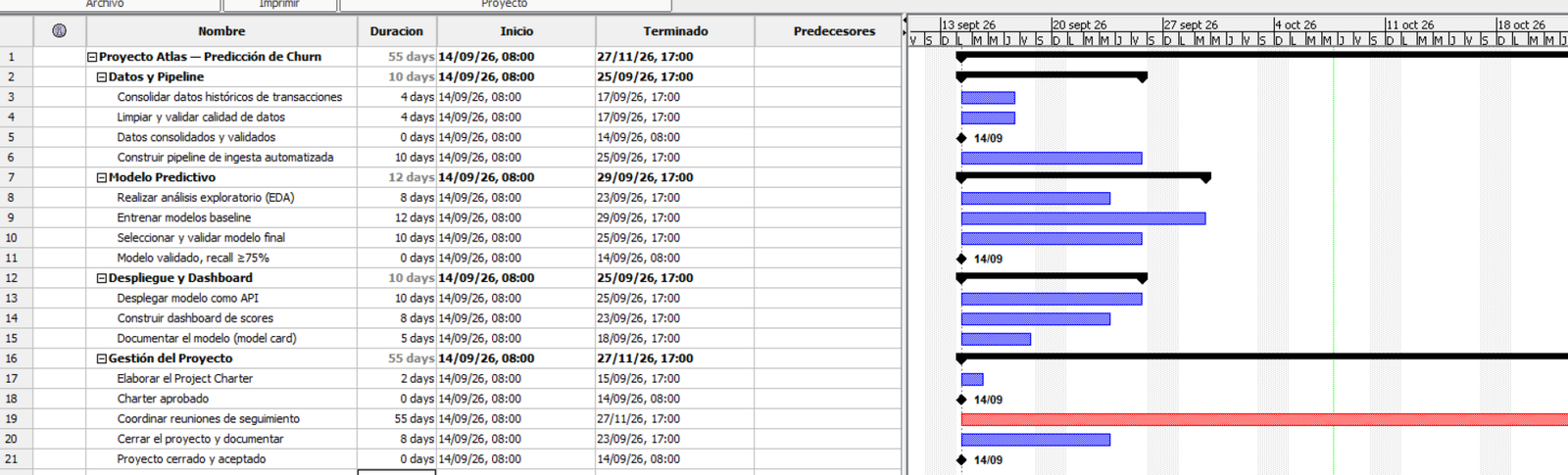 📸Captura 2Screenshot 2Gantt con todas las barras alineadas al inicio y la columna de duración llena.Gantt with all bars aligned at the start and the duration column filled.
Marca los hitosMark the milestones
En las filas 5, 11, 18 y 21 escribe 0d en Duration. Project Libre las dibuja como diamante ♦ en lugar de barra. Si alguna no cambia, abre su ventana de información y marca Milestone.On rows 5, 11, 18 and 21 type 0d in Duration. ProjectLibre draws them as a diamond ♦ instead of a bar. If one doesn't change, open its information window and tick Milestone.
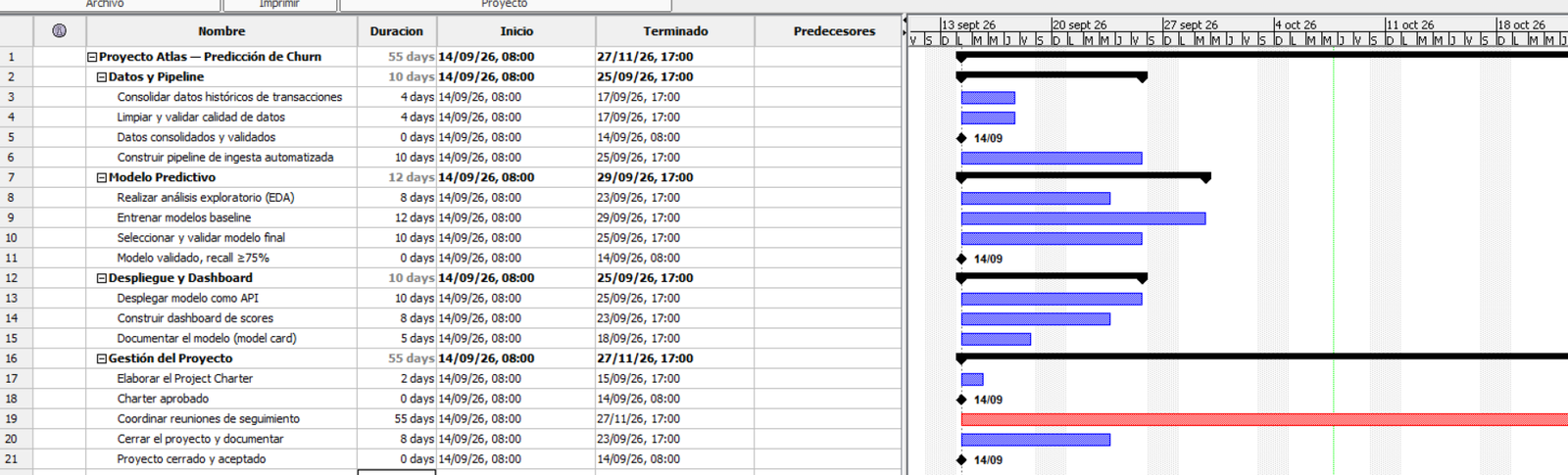 📸Captura 3Screenshot 3Los 4 diamantes visibles junto a las barras de actividades.The 4 diamonds visible next to the activity bars.
Agrega predecesores simples (Fin a Inicio)Add simple predecessors (Finish to Start)
En la columna Predecessors escribe el ID de la tarea previa, por ejemplo 3 en la fila 4. Con varias predecesoras sepáralas con coma, por ejemplo 6,10. Captura primero todas las filas que no llevan espera, excepto la fila 20, que se deja para el paso 5. Empieza por la fila 18 (17) y luego la 3 (18).In the Predecessors column type the ID of the previous task, e.g. 3 on row 4. With several predecessors separate them with a comma, e.g. 6,10. Fill in first all rows that carry no lag, except row 20, which is left for step 5. Start with row 18 (17) and then row 3 (18).
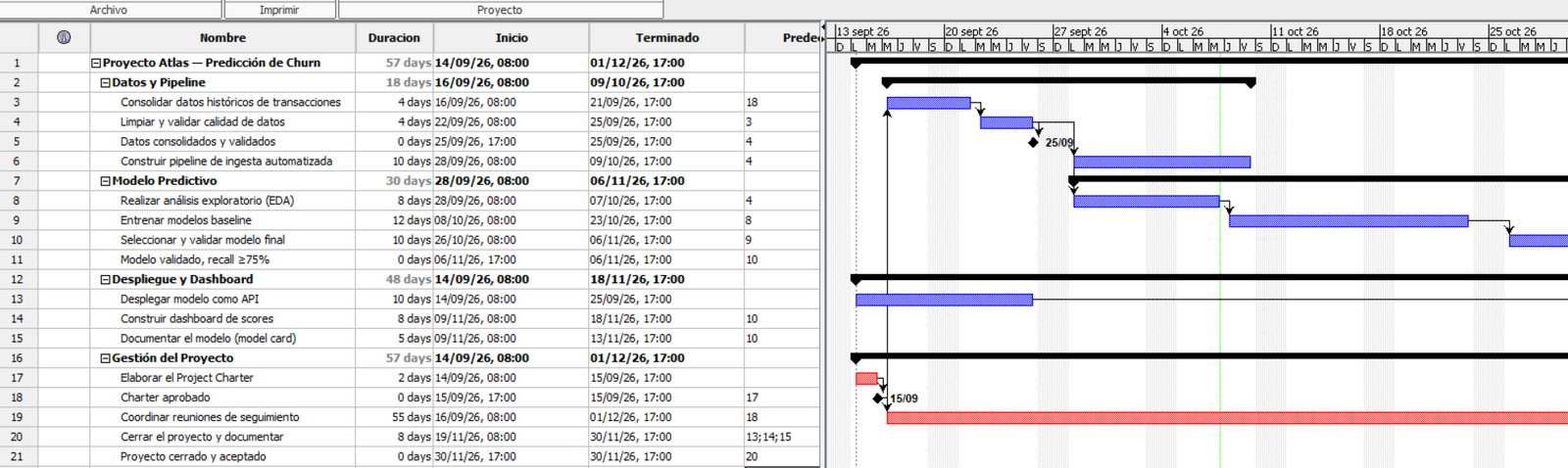 📸Captura 4Screenshot 4Gantt con las flechas de los predecesores simples (todavía sin las filas 13 y 20).Gantt with the simple-predecessor arrows (still without rows 13 and 20).
Agrega la espera FS+2dAdd the FS+2d lag
En la fila 13 escribe en Predecessors 6,10FS+2d. Se lee: "empieza 2 días después de que termine la tarea 10, y también cuando termine la 6". Si tu versión no acepta ese texto, haz doble clic en la tarea 13, abre la pestaña Predecessors, elige la fila de la tarea 10, tipo Finish-to-Start y escribe 2d en Lag. Compara antes y después: la API debe moverse 2 días a la derecha. Solo entonces captura la fila 20 (13,14,15): ProjectLibre marca error si la fila 13 aún no tiene sus predecesores.On row 13 type 6,10FS+2d in Predecessors. It reads: "start 2 days after task 10 finishes, and also once 6 finishes". If your version doesn't accept that text, double-click task 13, open the Predecessors tab, pick the task 10 row, type Finish-to-Start and enter 2d in Lag. Compare before and after: the API must shift 2 days to the right. Only then fill in row 20 (13,14,15): ProjectLibre shows an error if row 13 doesn't have its predecessors yet.
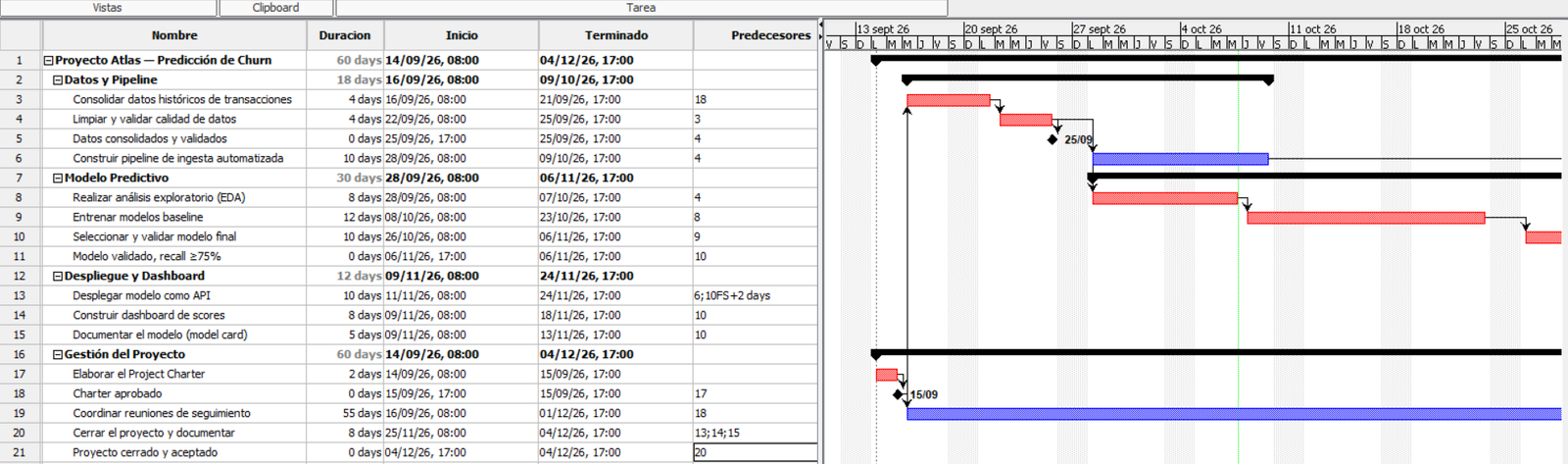 📸Captura 5Screenshot 5La ventana de la tarea 13 con el lag de 2d, y el hueco visible entre la 10 y la 13, y la fila 20 con sus tres flechas entrantes.Task 13's window showing the 2d lag, and the visible gap between 10 and 13, and row 20 with its three incoming arrows.
Revela la ruta críticaReveal the critical path
Activa el resaltado de tareas críticas (en el Gantt, o en View → Network). Las barras en rojo son las de holgura cero. Deben coincidir con las 🔴 de la solución. Si les sale otra ruta, revisen predecesores y la espera de la fila 13.Turn on critical-task highlighting (in the Gantt, or in View → Network). Red bars have zero float. They must match the 🔴 in the solution. If you get a different path, check predecessors and the row 13 lag.
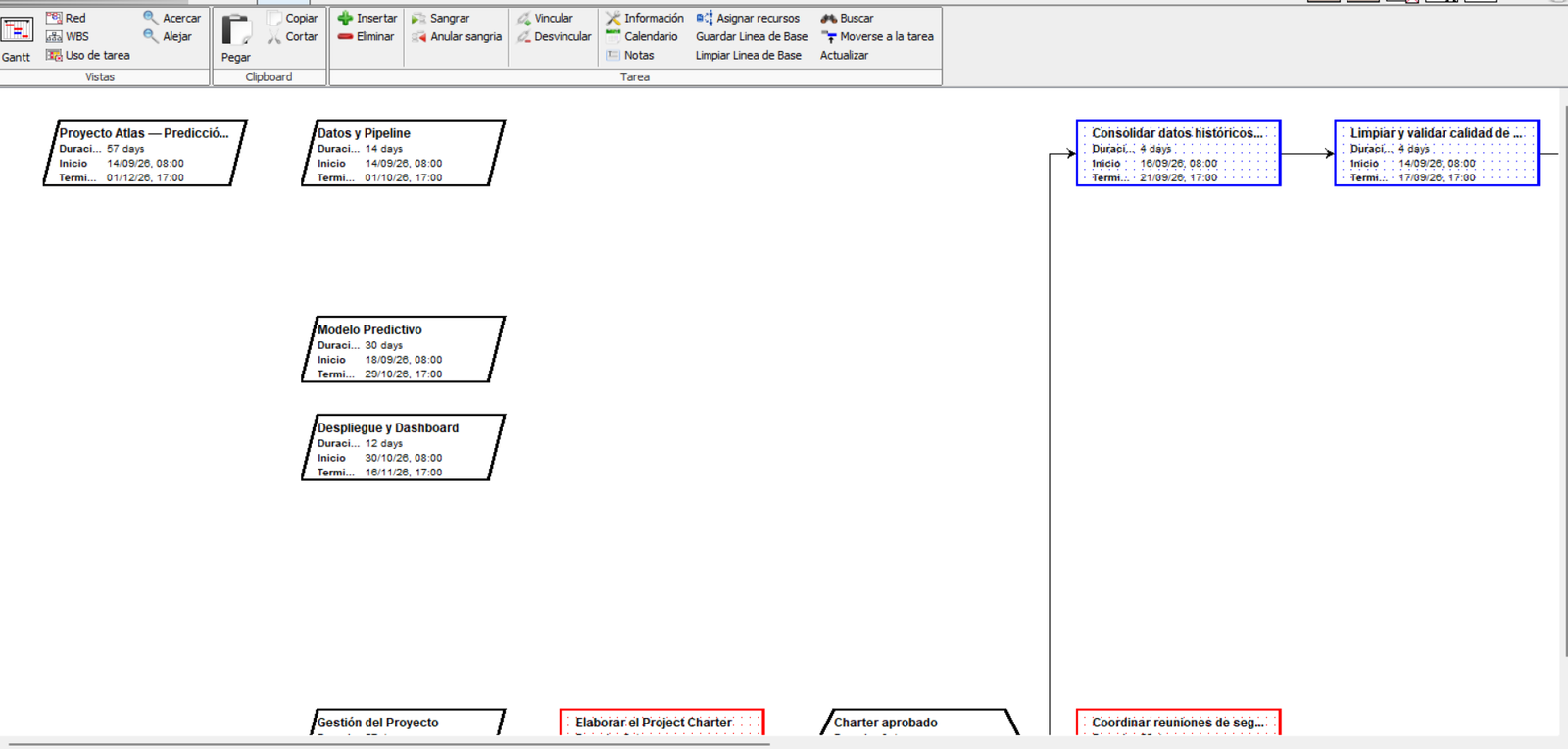 📸Captura 6Screenshot 6Gantt completo con la ruta crítica en rojo; el proyecto debe terminar el día 60.Full Gantt with the critical path in red; the project must end on day 60.
Verifica las holgurasCheck the float
Agrega las columnas de Total Slack (holgura total) y las fechas de inicio y fin tempranas/tardías. Revisa que Pipeline, Dashboard, Model card y Reuniones tengan holgura mayor que cero y que la tabla coincida con la solución. Prueba: alarga el Dashboard de 8d a 13d y observa cómo se vuelve crítico y mueve el cierre. Regresa a 8d.Add the Total Slack column and the early/late start and finish dates. Check that Pipeline, Dashboard, Model card and Meetings have float above zero and that the table matches the solution. Experiment: lengthen the Dashboard from 8d to 13d and watch it become critical and move the close. Set it back to 8d.
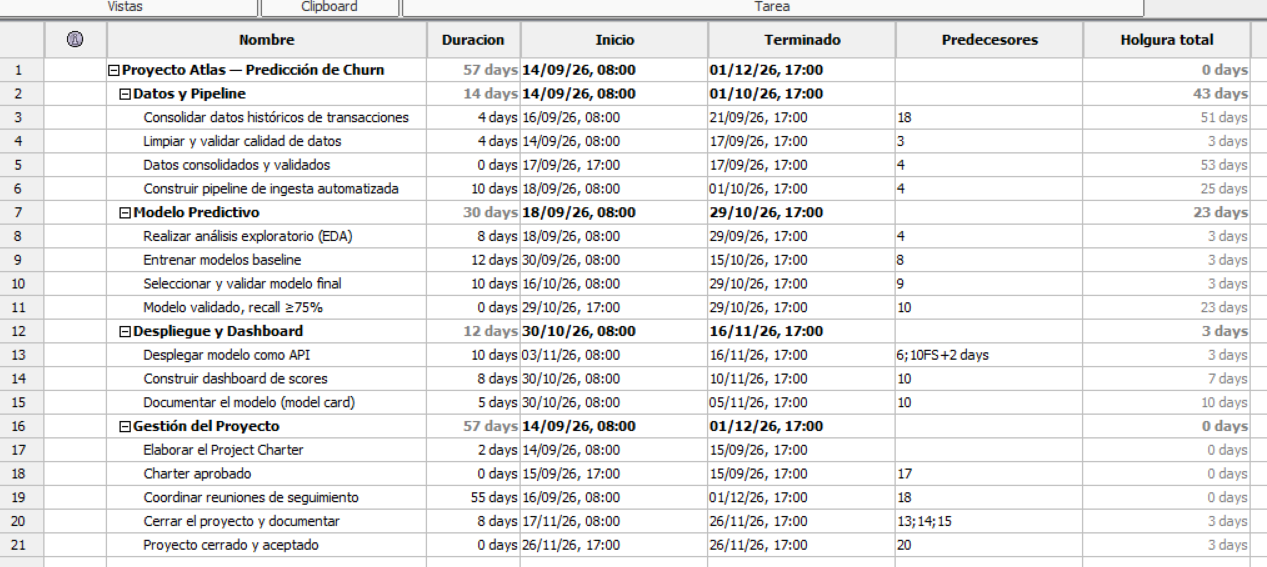 📸Captura 7Screenshot 7Tabla con la columna de holgura total y las tareas con holgura > 0 resaltadas.Table with the total slack column and tasks with float > 0 highlighted.
Exporta tu evidenciaExport your evidence
Guarda el .pod y exporta el Gantt final con la ruta crítica visible (imagen o PDF). Eso, junto con tu tabla de tareas, es lo que subes a Canvas.Save the .pod and export the final Gantt with the critical path visible (image or PDF). That, together with your task table, is what you upload to Canvas.
La Misión: Resuelvan su Propio CasoThe Mission: Solve Your Own Case
Reunir las Pistas (primer saque)Gather the Clues (rough draft)
Con su equipo y proyecto asignados, listen todas las actividades que salen de su WBS (Nivel 3 y sus descomposiciones de Nivel 4), con una duración estimada para cada una. No se detengan a discutir el orden todavía — solo reúnan la evidencia. With your assigned team and project, list every activity coming from your WBS (Level 3 and its Level 4 breakdowns), with an estimated duration for each. Don't stop to discuss order yet — just gather the evidence.
Interrogar a Cada SospechosoInterrogate Every Suspect
Para cada actividad, hagan la pregunta clave antes de anotar un predecesor: For every activity, ask the key question before writing down a predecessor:
Si la única respuesta es "porque estaba justo antes en mi lista", esa actividad queda libre de sospecha — probablemente puede correr en paralelo. Anótenla sin esa dependencia falsa. If the only answer is "because it was right before it on my list", that activity is cleared of suspicion — it can probably run in parallel. Write it down without that false dependency.
Repitan esto con las 15-25 actividades de su proyecto. Cada dependencia que sobrevive el interrogatorio es un predecesor real. Repeat this with your project's 15-25 activities. Every dependency that survives the interrogation is a real predecessor.
Resolver el Caso en Project LibreSolve the Case in ProjectLibre
Con las dependencias reales confirmadas, construyan la red completa en Project Libre siguiendo los pasos de la sección 2. Dejen que el software calcule ES/EF/LS/LF y les revele la ruta crítica. With the real dependencies confirmed, build the full network in ProjectLibre following the steps in section 2. Let the software calculate ES/EF/LS/LF and reveal the critical path.
Ganen su Placa de DetectiveEarn Your Detective Badge
Marquen cada punto conforme lo completen — su puntaje y placa se actualizan solos: Check each item as you complete it — your score and badge update automatically:
Plantilla en Blanco para su ProyectoBlank Template for Your Project
🔀 Recuerden: Cruda en clase, Refinada en CanvasRemember: Raw in class, Refined on Canvas
La Fase 1 y 2 (reunir pistas, interrogar sospechosos) son su versión cruda — pueden hacerla a mano o en post-its. Lo que suben a Canvas es la versión refinada: el archivo .pod de Project Libre más una captura del Gantt con la ruta crítica visible.
Phase 1 and 2 (gathering clues, interrogating suspects) are your raw version — you can do them by hand or on sticky notes. What you upload to Canvas is the refined version: the ProjectLibre .pod file plus a screenshot of the Gantt with the critical path visible.